
Washington State Accessible IT Capacity Building Institute on Policy #188 (2016)

Aaron Powell, UW Interm Vice President for UW-IT and CIO, addresses the group.
This publication shares the proceedings of Washington State Accessible IT Capacity Building Institute on Policy #188, which was held in Seattle, Washington on November 29 – 30, 2016. Attendees included individuals identified by their institution as the Policy #188 IT accessibility coordinator from higher education institutions across Washington State. Policy #188 serves to ensure that IT procured, developed, and used by state agencies, including public colleges and universities, is accessible to and usable by individuals with disabilities.
These proceedings may be useful for people who
- participated in the CBI,
- have been identified to be the coordinator regarding the agency’s information technology accessibility plan and to support complaint resolution,
- are developing policy and processes to support and ensure compliance with this policy and associated standard, and
- are addressing similar accessible IT issues at postsecondary institutions nationwide.
This event was sponsored by UW Accessible Technology Services (ATS) at the University of Washington (UW), a UW-IT (University of Washington Information Technology) unit that directs both the Access Technology and DO-IT (Disabilities, Opportunities, Internetworking, and Technology) Centers. The meeting was facilitated by Dr. Sheryl Burgstahler, the director of ATS. ATS’s two centers are dedicated to empowering people with disabilities through technology and education. They promote awareness and accessibility to maximize the potential of individuals with disabilities and make our communities more vibrant, diverse, and inclusive.
The DO-IT Center strives to
- increase the success of people with disabilities in challenging academic programs and careers;
- promote the application of universal design to physical spaces, information technology, instruction, and services;
- freely distribute online content, publications, and videos for use in presentations, exhibits, and the classroom; and
- provide resources for students with disabilities, K-12 educators, postsecondary faculty and administrators, librarians, employers, parents, and mentors.
The Access Technology Center (ATC) focuses on ensuring UW students, faculty, and staff with disabilities have the same access to technology—including computers, software, and special equipment—as other students, faculty, and staff. ATC staff help individuals select and use assistive technology and supports a showroom with numerous products:
- speech and braille output
- screen magnification
- alternatives to the keyboard and mouse
- speech recognition software
- tools to make reading and writing easier and computer use more comfortable
- the capacity to create documents in e-text and braille
The show room includes a collection of accessible science equipment such as automatic stirrers, tactile measuring devices, and talking calculators. The ATC provides braille embossing and tactile graphics for the UW community.
ATC staff promote the development and use of accessible technology products by
- encouraging student computing facilities to include assistive technology;
- offering courses, delivering presentations, and conducting ATC tours for UW classes and other groups;
- working with campus units to prepare documents, videos, and other materials in accessible electronic formats;
- assisting campus web developers in designing accessible websites and applications;
- working with vendors of IT products used by the UW to improve accessibility; and
- supporting a central resource to provide guidance to technologists and administrators at the UW and beyond.
About the CBI
The Washington State Accessible IT Capacity Building Institute on Policy #188 provided a forum for prioritizing work to help every institution meet the requirements presented in the Policy established in 2016. Attendees included disability service and computing professionals and Policy #188 coordinators from postsecondary institutions across Washington State. This CBI aimed to improve the accessibility of IT developed, procured, and used by Washington State postsecondary institutions. Our objectives include increasing our capacity to build upon the following:
- understanding of federal legislation and Washington State Policy #188
- knowledge of successful practices
- relationships between those who implement Policy #188
The CBI included presentations and discussions. Participants from various institutions shared promising practices and successful endeavors in accessible IT. In small working groups, participants also responded to the following questions:
- What is (1) helping and (2) holding back your progress on implementing Policy #188?
- What are key steps you are planning to take to implement Policy #188, short term and long term?
In this CBI
- all participants contributed to its success,
- experts in key topic areas were in the audience, and
- new ideas evolved from discussions.
CBI participants shared their diverse perspectives and expertise. The agenda for the CBI and summaries of the presentations are provided on the following pages.
Agenda
Location: Husky Union Building (HUB) 145, UW Seattle Campus
Hosted by Accessible Technology Services (ATS), UW-IT
Moderator: Sheryl Burgstahler, Director ATS
8:30 – 9:00 am
Pastries, Fruit, Coffee, Tea, Informal Networking
9:00 – 10:00 am
Welcome, Introductions, Goals, Objectives, Overview, Sheryl Burgstahler
Meeting Goal: Improve the accessibility of IT developed, procured, & used by public postsecondary institutions in Washington State
Objectives: Increase understanding of requirements of Policy #188, share & develop plans for implementing Policy, and build relationships between those implementing Policy state-wide.
10:00 – 11:00 am
Evolving WCAG Guidelines, Terrill Thompson, UW ATS Accessible Technology Specialist
11:00 – 11:15 am
Break
11:15 – 11:45 am
Update on Policy #188, Ryan Leisinger, WATech
11:45 – 12:45 pm
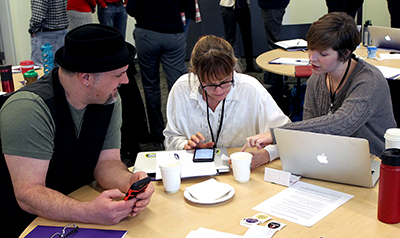
Small Group Discussion & Lunch: What is (1) helping and (2) holding back your progress on implementing Policy #188?
Write responses on post-its & place on poster sheet under two columns.
12:45 – 1:15 pm
Report Out From Small Group Discussions
1:15 – 2:45 pm
Panel of Participants Sharing Promising Practices for Implementing Policy #188
Each will speak up to 15 minutes about overall progress or a specific successful practice. Q&A for all will be at the very end.
- Carly Gerard, Western Washington University
- Bridget Irish, The Evergreen State College
- Ana Thompson, University of Washington, Bothell
- Joetta Sieglock, Eastern Washington University
2:45 – 3:00 pm
Break
3:00 – 3:30 pm
Small Group Discussions: What are key steps you are planning to take to implement Policy #188, short term and long term?
Write responses on post-its & organize on poster sheet in categories.
3:30 – 4:00 pm
Report Out From Small Group Discussions
4:00 – 4:30 pm
Conclusion, Comments, Future Plans & Evaluation
Presentation Summaries
What is meant by Neurodiversity and what do Neurodiverse students want?
Ronda Jenson, Northern Arizona University and Scott Bellman, NNL Project Director
Video Link (Length: 1:03:05)
As shared by Scott Bellman, DO-IT’s Neuroscience for Neurodiverse Learners (NNL) project provides hands-on experiences in neuroscience disciplines, networking opportunities, and resources to high school and early post secondary students. The project also provides resources for educators and stakeholders such as a website and online knowledge base, workshops, video productions, and publications.
Neurodiverse learners we work with in the NNL project face academic challenges related to specific learning disabilities (e.g., dyspraxia, dyslexia, dyscalculia), attention deficit disorders (ADD, ADHD), autism spectrum disorder (ASD), Tourette syndrome, and other conditions impacting cognitive processing.
Within the NNL project, high school and early postsecondary students learn about and engage in scientific communication, social skills and teamwork, college preparation, leadership building, self-advocacy, neuroscience and neural engineering, and ethics related to emerging technologies.
NNL uses principles of universal design (UD) by proactively designing materials and activities that are accessible and inclusive for individuals with a broad range of characteristics, including disabilities. Below are examples of how we implement these principles:
- Offerings are available both on-site and online.
- All activities provide dedicated spaces for reflection and quiet.
- Materials are provided in a variety of formats, and captions are provided for videos and video conferencing activities.
- Students are offered multiple ways to engage in learning.
- Project staff prepare “social narratives” to describe what students can expect before an activity occurs, or before coming to campus. For example, prior to NNL's annual summer camp, students are sent images of the campus, buildings, and classrooms where they will be conducting work. The images are supplemented with descriptions of each space.
The project offers hands-on learning and student-guided learning. For example, during summer camp activities, students are asked about topics they would like to explore, and then the topics are added to the camp curriculum. Such student-driven topics have included the effect of meditation on the brain, the impact of music on the brain, and neuroscience in movies.
The project promotes near-peer leaders, defined as neurodiverse STEM students who are slightly older than our main project participants. Near-peer leaders are very effective at helping students navigate the learning content, participate in discussions, and engage in activities.
Another project that focuses on neurodiverse students is the Discover Your Unique Advantage in STEM (DYNA STEM) project. DYNA STEM has gathered information to elevate the voices of 21 neurodiverse undergraduate students in STEM across three states: Arizona, Missouri, and Ohio. The project encourages developing an understanding of universal design, adult learning principles, trauma-informed approaches, and embracing intersectionality. It offers the following suggestions for STEM educators:
- Acknowledge undergraduate students as adult learners who bring diverse learning histories to the classroom.
- Acknowledge that learning histories may be positive, negative, or indifferent.
- Acknowledge the intersectionality of cultural backgrounds, identities, and personal histories.
- Acknowledge differences in the ways undergraduate students perceive, approach, and interact with new information and skills.
The students who engaged with DYNA STEM shared what they want in education settings:
- Specific, clear instructions
- Flexibility for self-guided learning
- Balance of peer learning, hands-on, and direct instructions (aka-not just lecture or not just group project)
- Choice: Options to choose and not choose activities or steps
- Visuals and graphics, not just text-based
- Opportunities to be creative
- Clear, logical applications to real-world STEM work
- Sensory stimuli focused on specific tasks
- Physical space options for standing and sitting, with options for orientation in the space
- Clear social expectations
Through interactions with neurodiverse students, educators are encouraged to explore the following questions:
- What does intersectionality mean to undergraduate neurodiverse students?
- In what ways do we acknowledge neurodiverse undergraduate students as adult learners?
- What can we do to show respect for the trauma-histories neurodiverse undergraduate students may have?
How Can Universal Design Impact Neurodiverse Learners?
Sheryl Burgstahler, NNL PI
Video Link (Length: 1:00:52)
An inclusive environment embraces all potential participants who meet requirements with or without accommodations and makes sure everyone feels respected and engaged. Ability exists on a continuum, where all individuals are more or less able to see, hear, walk, read printed material, communicate verbally, tune out distractions, learn, or manage their health. This is also true of abilities related to neurodivergence, such as learning differences and differences in cognitive processing–such differences exist on a continuum.
Most disabilities of neurodiverse learners have invisible disabilities—meaning they aren't obvious to most people—and many students don’t report their disabilities to postsecondary disability service offices. Regardless, we want to ensure that students have access to the classes and labs we teach, as well as the learning resources we share.
Students’ identities are also multi-faceted, which means we must take an intersectional approach that acknowledges that some students are from more than one underrepresented group. Students who are neurodiverse may also identify as black or African American, a woman, or other minority identities. It is important to listen to students and to be sensitive to their identities and ways they have been discriminated against.
How society views disability has changed throughout the years. People with disabilities historically have been eliminated or excluded from society, segregated from the general population, aimed to be cured, rehabilitated, accommodated, and finally, accepted and included as they are. The modern approach has its roots in social justice and aims to allow all people to feel included, including those with disabilities.
There are two approaches for making college and university campuses accessible: accommodations and universal design (UD). Accommodations are reactive and address the inaccessible features of a product or environment to make it more accessible to a particular individual (e.g., captioning a video when a student with a hearing impairment requests it). Universal design is a proactive approach for creating a product or environment accessible to the most diverse group possible (e.g., captioning all videos by default). A building with stairs at the entrance and a separate ramp for people with wheelchairs is technically accessible, while a building with a single entrance that everyone can use is universally designed.
Universal design doesn’t just help people with disabilities—sloped entrances help people moving carts, and captions help those learning English or in noisy environments, as just a few examples. Universally designed technology should have built-in accessibility features and ensure compatibility with assistive technology.
UD is an attitude that values diversity, equity, and inclusion. It can be implemented incrementally, focuses on benefits to all students, promotes good teaching practice, does not lower academic standards, and minimizes the need for accommodations. UD can be applied to all aspects of learning, including class culture and climate, physical environments, delivery methods, products, and information resources, delivery of feedback, and assessments.
To review an easy to use checklist, visit Equal Access: Universal Design of Instruction. For more tips, you can follow the 20 Tips for Teaching an Accessible Online Course.
Disability Representation in the Media
Kayla Brown, DO-IT Project Coordinator
Video Link (Length: 0:30:32)
Media representation is the way in which the media portrays particular groups, communities, and experiences. This includes the accuracy of portrayals, the diversity of perspectives, and whether those portrayals perpetuate negative stereotypes. It's not just about quantity—it's about quality. This session explored common tropes in the media about disability and examined examples of neurodivergent characters.
Examining the media is important because television and movies influence the way people think. If portrayals exhibit negative stereotypes, this will affect how we see groups of people as a whole. One unique aspect of many neurodiverse characters is that they are coded as having a disability. Coding characters means that they are written in a way to imply something about them, such as having a disability. A character may have the behavior of someone with autism, but it is not confirmed explicitly through dialogue or from the writers.
If we can increase the number and quality of media representation of people with disabilities, we can begin to introduce the world to more accurate depictions of people with disabilities. We can start a real conversation about disabilities and establish points of reference for it. In this way, fictional characters in television and movies have the power to alter prevailing ideologies and attitudes in society.
Accessible Technology for Neurodiverse Learners
Gaby de Jongh, University of Washington
Video Link (Length: 0:52:09)
Accessible electronic and information technology can be used by people with a wide variety of abilities and disabilities and incorporate the principles of universal design. Assistive technology can maintain or improve functionality and provide numerous benefits to neurodiverse learners by addressing specific learning needs, supporting strengths, and promoting independence. Assistive technology helps remove barriers to learning by providing accessible alternatives to traditional methods. It can accommodate various learning styles, sensory sensitivities, and physical challenges, ensuring equal access to educational materials and opportunities.
Assistive technology should be selected based on individual needs and preferences, and it should be accompanied by appropriate guidance and support from professionals and educators to ensure effective training and implementation. There are many examples of assistive technology that may benefit neurodiverse learners:
- Social communication aids, such as social skill training apps, video modeling tools, or augmentative and alternative communication (AAC) devices
- Social engagement opportunities and classes or discussions on communication skills
- Text-to-speech software that reads text aloud, making it easier to comprehend and process information--text-to-speech software can adapt to the specific needs, preferences, and pace of neurodiverse learners, which allows for individualized instruction, customization of learning experiences, and easier engagement
- Visual schedules, reminders, task managers, and digital planners that help learners stay organized, manage time effectively, and improve executive functioning abilities
- Noise-canceling headphones, ambient sound generators, or apps that block distractions, enhance concentration, and create a more conducive learning environment
- Sensory-friendly interfaces, adjustable lighting, and/or noise reduction options create a more comfortable and inclusive learning environment
Discussion Summaries
What is (1) helping and (2) holding back your progress on implementing Policy #188?
Factors that promote IT accessibility efforts include the following:
- Access360 grants that offer a yearlong mentorship opportunity for cross-functional campus teams as they implement accessibility policies on a broad scale to effectively, efficiently and equitably serve students, employees and community members
- capacity building institutes that offer opportunities to talk more in depth about accessibility issues and find more resources
- strong support received from campus leadership, supervisors, purchasing, administration, faculty, and other groups
- trainings offered to staff and faculty
- ongoing engagement continued across campus through events, emails, workshops, reminders, and discussion groups
- resources offered by Washington State Board for Community & Technical Colleges, Accessible Technology Services, Disability Services, and other groups
- committees created to continue engaging on accessibility topics and push for change around campuses
- standards confirmed and stipulated in a method that is easy to understand, carry out, and enforce
Factors that hold IT accessibility efforts back include the following:
- inadequate numbers of staff members to tackle necessary tasks
- not enough people educated in accessibility issues
- lack of appropriate resources to share
- a procurement process that does not always consider accessibility when purchasing new hardware and software
- costs to make IT accessible that are higher than the institution or individual departments are willing to pay
- the State‘s lack of processes in place to enforce accountability practices
- staff and faculty that resist change or see accessibility as a disability services not an IT issue
- lack of mandatory IT accessibility trainings for all staff and faculty
- inadequate buy-in from leadership can make accessibility a lower priority
- inaccessible testing software and methods, creating a complication for faculty and students
- different website platforms that offer different accessibility features, thus making it difficult to train the average web developer or staff member on accessible practices
What are key steps you are planning to take to implement Policy #188, short term and long term?
Short term, we plan to
- set regular meeting schedule and invite new members to the Accessible Technology Team;
- keep stakeholders and others on campus informed on a quarterly basis, as well as share resources and awareness;
- determine spending costs on training options and create a schedule of training opportunities;
- reorganize the budget to include accessibility practices;
- select which staff can follow through with specific tasks and create an ongoing auditing process;
- review all policies and make sure all standards include accessibility; and
- update Canvas resources for faculty to include more demonstrable accessibility info.
Long term, we plan to
- follow through with scheduled, routine audits of accessibility;
- review and revise the accessibility plan to include specific language, suggestions for Benchmark Survey of Access360, an executive summary, a training schedule, and target deadlines;
- establish workflows for approving procurements, design, and modification of web applications;
- establish a team for testing applications and systems for compliance;
- identify stable, long-term funding for captioning, as well as assign staff to coordinate;
- identify staff to run training for accessible document creation and promote these trainings to faculty and staff. Offer PDF remediation and conversion to HTML for some;
- meet again after Policy #188 is updated;
- add accessibility knowledge to job descriptions;
- train web developers and publishers on WCAG;
- update procedures in October 2019 to match new WCAG 3.0;
- meet with leadership teams to help get buy-in and create higher priorities for accessibility;
- include students with disabilities who could assist in reviewing, testing, and developing accessible technology; and
- create a campus-wide plan for accessibility.
CBI Participants
Stakeholder groups represented in the CBI included
- disability student service leaders and administrators,
- postsecondary IT professionals, and
- Policy #188 coordinators.
The following individuals participated in the CBI.
Ana Thompson
UW Bothell
Anna Marie Golden
University of Washington
Ashley Magdall
University of Washington Bothell
Bridget Irish
The Evergreen State College
Carly Gerard
Western Washington University
Curtis Perera
Bellingham Technical College
Dale Coleman
Tacoma Community College
Dan Comden
University of Washington
Danny Messina
Eastern Washington University
David Engebretson Jr.
Western Washington University
Doug Hayman
University of Washington
Gaby de Jongh
University of Washington
Hadi Rangin
University of Washington
Ian Campbell
University of Washington
Jeane Marty
UW Bothell
Jessica Carey
Clover Park Technical College
Joel Gavino
Pierce College
Joetta Sieglocki
Eastern Washington University
Justin Busby
Yakima Valley CC
Karla Ealy-Marroquin
WSU Spokane Health Sciences
Kathleen chambers
North Seattle College
Linda Schoonmaker
Big Bend Community College
Lora Allen
Big Bend Community College
Lyla Crawford
University of Washington
Marisa Hackett
Renton Technical College
Mary Gerard
Bellingham Technical College
Max Bronsema
Western Washington University
Rose Madison
Everett Community College
Ryan Leisinger
WA State
Sheryl Burgstahler
University of Washington
Susie Hawkey
University of Washington
Terrill Thompson
University of Washington
Communities of Practice
UW Accessible Technology Services engages stakeholders within Communities of Practice (CoPs). CoP members share perspectives and expertise and identify practices that promote the participation of people with disabilities in postsecondary education.
Accessible IT CoP
This CoP is populated with disability services and IT professionals interested in increasing the accessibility of IT in postsecondary education, particularly in Washington State. Participants
- exchange information, ideas, and suggestions for future collaboration,
- gain and share knowledge and help identify issues related to IT accessibility in higher education, and
- recruit others to participate in the CoP.
Universal Design in Higher Education CoP
This CoP is comprised of individuals interested in exploring universal design (UD) and its applications in higher education. Participants on this CoP discuss
- promising practices for infusing universal design on postsecondary campuses;
- applying UD to all educational opportunities that include instruction, technology, student services and physical spaces; and
- specific topics in the book Universal Design and Higher Education: From Principles to Practice and contribute materials to be shared through the Center on Universal Design in Education.
Accessible Distance Learning CoP
Distance learning program administrators, instructors, and support staff use the Accessible Distance Learning CoP to increase their knowledge about disabilities and make changes in distance learning that lead to more inclusive practices. Members discuss
- management,
- staffing,
- training, and
- policy issues related to creating accessible distance learning courses and programs.
You and your colleagues can join the CoP by sending the following information to doit@uw.edu:
- name
- position/title
- institution
- postal address
- email address
- name of the CoP
or information about other CoPs, consult our website.
Resources
You can find the full text for Policy #188, information about waivers, and the minimum accessibility standard by visiting the following:
- Policy #188
- Standard #188.10 – Minimum Accessibility Standard
- Policy #103 – Technology Policy & Standards Waiver Request
The UW’s Accessible Technology website includes a variety of resources:
- the IT accessibility policy and guidelines for the UW
- legal issues and civil rights complaints and resolutions nationwide
- instructions and tips for making IT accessible
- more resources for creating and procuring accessible IT products
The DO-IT (Disabilities, Opportunities, Internetworking, and Technology) website contains the following:
- information about DO-IT projects
- evidence-based practices that support project goals and objectives
- resources for students with disabilities
- educational materials for teachers and administration
DO-IT maintains a searchable database of frequently asked questions, case studies, and promising practices related to how educators and employers can fully include students with disabilities. The Knowledge Base is an excellent resource for ideas that can be implemented in programs in order to better serve students with disabilities. In particular, the promising practices articles serve to spread the word about practices that show evidence of improving the participation of people with disabilities in postsecondary education.
Examples of Knowledge Base questions include the following:
- Are electronic whiteboards accessible to people with disabilities?
- Are peer review tools accessible?
- Are there computer keyboards designed to be used with only one hand?
- Are touch screens accessible?
- Do postsecondary institutions have to provide assistive technology (for example, screen enlargement or voice recognition software) to students with disabilities who enroll in distance learning courses?
- Does a postsecondary institution have to provide specific hardware or software (known as assistive technology) that an individual with a disability requests so that they can access information technology used on campus?
- Does making our school web content accessible mean I cannot use multimedia on my site?
- How can educational entities determine if their websites are accessible?
Individuals and organizations are encouraged to propose questions and answers, case studies, and promising practices for the Knowledge Base. Contributions and suggestions can be sent to doit@uw.edu.
For more information on making your campus technology accessible and to learn more about accessible learning or universal design, review the following websites and brochures:
- The University of Washington’s hub for information on accessible technology, featuring how to create and develop accessible documents, videos, and websites, can be found at Accessible Technology.
- WCAG 2.0 are the expected guidelines to be followed for all websites.
- The Access Technology Center’s website.
- A list of thirty different web accessibility tips, and how to implement those tips.
- Accessibility training and certification.
- More information about accessibility standards and procurement.
- Cheat sheets for making accessible documents and content, as well as a plethora of other resources for accessible websites, can be found at the NCDAE.
- The AccessDL website shares resources for making distance learning and online courses accessible.
- Accessible University’s website featuring common web accessibility principles and solutions.
- A brochure on universally designing distance-learning programs.
- A brochure on what accessible distance learning is and how it helps students.
- A brochure on the top tips for creating an accessible distance-learning course can be found at the 20 Tips website.
- A brochure on why accessible web design matters, and some resources to make your website accessible, can be found at Accessible Web Design.
- Blindmath is a listserv for those who want to learn more about all issues around accessible mathematics.
- More information on universal design in education can be found at the Center for Universal Design in Education.
Conferences can be a great way to share resources, collaborate, and come up with new ideas. Consider attending the following:
- ATHEN (Accessing Higher Ground)
- CSUN
- ATIA
- Closing the Gap
- Smaller, local IT conferences, like TechConnect
- NW E-Learn
- EDUCAUSE
- Building Bridges
- Faculty Accessibility Retreat for 2-year colleges
Acknowledgments
The Washington State Accessible IT Capacity Building Institute on Policy #188 was funded by Access Technology Services at the University of Washington. Any opinions, findings, and conclusions or recommendations expressed in this material are those of the CBI presenters, attendees, and publication authors and do not necessarily reflect the views of the University of Washington.
Accessible Technology Services
University of Washington
Box 354842
Seattle, WA 98195-4842
Accessibility at the University of Washington
doit.uw.edu/
206-685-3648 (voice/TTY)
888-972-3648 (toll free voice/TTY)
206-221-4171 (FAX)
509-328-9331 (voice/TTY) Spokane
© 2018 University of Washington. Permission is granted to copy this publication for educational, noncommercial purposes, provided the source is acknowledged.